Skip to content

For real estate agencies

Rental management software for real estate agencies. Your portfolio runs itself.

  • Free portfolio import
  • Link to the tax authority (AT)
  • Direct debit to each landlord's account

From applicant to signed lease

Rents collected, receipts issued

The AI agent replies and handles the request

Already using Aluseg

  • RE/MAX
  • ERA
  • Casas na Hora
  • Chave Nova
  • VE Imóveis

How it works

The agency's month, without Excel.

1Step 1

Import the portfolio

AI: uses artificial intelligence

Send the Excel file or the export from your current software. Our team imports the leases, landlords and tenants at no cost.

  • Prefer to do it yourself? Aluseg reads the leases and shows everything before saving.
Learn more: Import the portfolio

2Step 2

Collect by direct debit

The tenant signs the mandate and the rent goes by SEPA direct debit to each landlord's account. Aluseg does not hold third-party funds.

  • A SEPA transfer file (pain.001) pays all owners in one upload to your bank.
Learn more: Collect by direct debit

3Step 3

Issue the receipts on the tax authority portal

As soon as the rent is paid, the electronic receipt goes to the AT in each landlord's name. The agency stops logging in to the Portal das Finanças receipt by receipt.

  • On a portfolio of 40 leases, that is 480 receipts a year.
  • Status of each receipt at a glance, with a retry if it fails.
Learn more: Issue the receipts on the tax authority portal

4Step 4

Reconcile and report

Import the bank statement and each movement is matched to the right rent. What does not match stays in view so you can deal with it.

Learn more: Reconcile and report

5Step 5

Invoice your fees

Running account per landlord and per month: rents, expenses and fees. Close the month and send every statement at once.

  • Certified invoices for the fees come out of the monthly statement.
  • Owner portal always up to date, without calling you.
Learn more: Invoice your fees

Video

Aluseg in an agency, in 77 seconds

Rental management software for agencies | Aluseg demo (in Portuguese)

Video · 77 seconds · in Portuguese

From first contact to management

The agency's day to day, from finding the tenant to managing the rental.

1Find a tenant

Day to dayApplicants arrive by email, phone and WhatsApp, each with documents in a different format.

One application link per property

Put the link in the listing. The applicant sends ID, income and address in one go, and the application reaches the team with the dossier already attached.

  • One list of applications per property, with the status of each.
Learn more: One application link per property

2Choose

Day to dayComparing income and documents applicant by applicant, by hand, and deciding without certainty.

Verified dossier, applicants side by side

AI: uses artificial intelligence

The solvency check runs automatically, with rent-to-income and anti-fraud checks. Each applicant's dossier is verified before you move forward.

Learn more: Verified dossier, applicants side by side

3Sign

Day to dayAdapting the template from client to client and chasing every signature.

NRAU lease and e-signature

NRAU lease filled in with the portfolio data, signed electronically and reported to the tax authority with the landlord's tax number.

Learn more: NRAU lease and e-signature

4Collect and issue

Day to dayCollecting rent by rent and issuing a receipt per landlord, logging in to the Portal das Finanças again and again.

Direct debit and receipts on the tax authority portal

The rent goes by direct debit to each landlord's account and the electronic receipt goes to the tax authority in each one's name.

  • The full month, step by step, is in the section above.
See the month step by step: Direct debit and receipts on the tax authority portal

5Report to landlords

Day to dayLandlords call to ask whether the rent has arrived and ask for statements.

Owner portal, with a report

Each landlord opens their portal, with no account to create, and sees their properties, the rents received month by month and the month's statement. Repairs above the limit you set wait for your approval.

  • Fees per property, per landlord or by default.
  • Certified invoices for the fees come out of the statement.
Learn more: Owner portal, with a report

6Support day to day

Day to dayLate payments, breakdowns and requests arrive by phone and nobody knows where each case stands.

Late rent and requests, tracked

AI: uses artificial intelligence

Each late payment opens a case with the next step and the deadline, and the tenant gets an automatic reminder. Breakdowns and requests arrive with a category and a priority, and the tenant follows the status without phone calls.

  • Team with roles: administrator, manager or view-only.
  • One manager per property and a history of who changed what.
  • In the inbox, AI summarises each message and proposes the reply.
Learn more: Late rent and requests, tracked

Built-in artificial intelligence

AI handles the repetitive tasks. The team decides.

  • Reads leases and documents

  • Summarises and proposes replies

  • Analyses the applicant's dossier

  • Reads suppliers' quotes

  • Answers your questions

  • AI agent for incidents

Simulator

How much time does your team save?

Per lease and month, on average
  • 15 min: issuing the rent receipt on the Portal das Finanças
  • 15 min: checking payments and bank statements
  • 10 min: reminders and chasing late rents
  • 5 min: yearly rent update and letters
Per new lease
  • 45 min: collecting landlord and tenant data and documents
  • 1 h: drafting and reviewing the lease
  • 30 min: signatures
  • 45 min: registering the lease with the tax authority (AT)

Hours saved per month39 h

Value of that time, per month€585

After the 3 free months: Pro plan (+ VAT, per month)€59

An estimate, not a promise of results. The starting values are our estimate of the manual work and depend on each team: replace them with yours. 3 months free for agencies; then the Pro plan (up to 250 leases).

Create a free account

An alternative to Excel

Excel + Portal das Finanças vs Aluseg

 Excel + Portal das FinançasAluseg
Landlords and propertiesOne sheet or tab per landlord, linked by handEach property linked to its landlord, with a landlord filter on the portfolio map
NRAU leasesOne template copied and adapted from client to clientNRAU lease filled in, with e-signature
Reporting to the ATLog in to the Portal das Finanças and report, lease by leaseLease reported to the AT from the app
Electronic rent receiptsOne receipt per rent and per landlord, issued by hand every monthElectronic rent receipt issued every month, per landlord
Checking paymentsBank statements compared line by line with the sheetBank statement imported and rents matched to leases (bank reconciliation); optional SEPA direct debit
Late rentA red cell and the memory of whoever follows itEach late payment opens a case with the next step, the deadline and the timeline
Yearly rent updateLook up the coefficient, calculate and write the letterNew rent calculated with the official coefficient and the letter prepared, in bulk
Tenant applicantsDocuments by email and income compared by handApplication link per property and automatic solvency analysis
Reporting to the landlordA statement put together by hand and emailed, landlord by landlordMonthly account closed and sent in bulk, with the owner portal always up to date
Invoicing the feesWork out each landlord's commission and invoice in another programFees calculated on the statement and a certified invoice issued from it
Team and landlordsOne shared file, with versions and mistakesTeam in the same account and a tenant portal with the agency's brand
CostFree in licences, paid in team hours3 months free; then from €29/month + VAT (billed yearly)

The difference

Property management software or rent management software?

Agencies searching for property management software usually find two very different kinds of tool. Brokerage software is the CRM, listings, viewings, offers and portal ads: it handles everything that happens until the agency has a tenant. Rental management software, also called rent management software, handles what happens once you have a tenant, from the lease to each month's receipt. That is Aluseg.

Aluseg does not source properties or replace your CRM: it takes over the repetitive part of rental management, the part that weighs most once the portfolio passes 20 or 30 leases. To compare with the market, read our guide to the best landlord software in Portugal and the honest comparison of Rentila alternatives.

What to ask of a rent management tool: NRAU-compliant leases, with e-signature and reporting to the AT; electronic rent receipts, issued without logging in to the Portal das Finanças for each landlord; collection and payment checks, with late payments always in view; a yearly rent update with the official coefficient and the letter ready to send; several users and several landlords in the same account, with each property linked to its landlord; a professional image, for the landlord and the tenant, with the agency's brand.

Electronic rent receipts. On a portfolio of 40 leases that is 40 receipts a month and 480 a year, each with the right amount, date and lease. On Aluseg the lease is reported to the AT and the receipt is issued every month, with each landlord's authorisation and credentials. For the manual process, see how to issue a rent receipt on the Portal das Finanças. For individual landlords (category F). For companies and category B, Aluseg exports the invoicing data (CSV) to each owner's certified invoicing software.

Yearly rent update. Looking up the coefficient, calculating the new rent and writing the letter, lease by lease. On Aluseg the calculation and the letter are prepared, in bulk and by landlord. See the rent update coefficient and the rent update calculator.

Late rent. The earlier a late payment is spotted, the cheaper it is to fix. See tracking rent payments and what to do in the first 30 days of unpaid rent.

When Excel stops being enough: with more than 20 leases, some receipts go out late or are never issued; when more than one person edits the file and there have already been different versions; when nobody is sure when each rent is next due for an update; or when the landlord wants an update and the answer means opening several tabs.

And also: expenses per property with invoice scanning, Annex F per landlord, a tenant portal with the agency's brand, the accountant portal and payments to landlords. Connect the account to Claude or ChatGPT to ask, in conversation, which rents are late (read-only access, on every plan). The agency's email lands in the inbox and AI agents draft the replies to tenants' messages. WhatsApp is in beta with some of our users.


Offer for agencies

Switch to Aluseg without stopping the office.

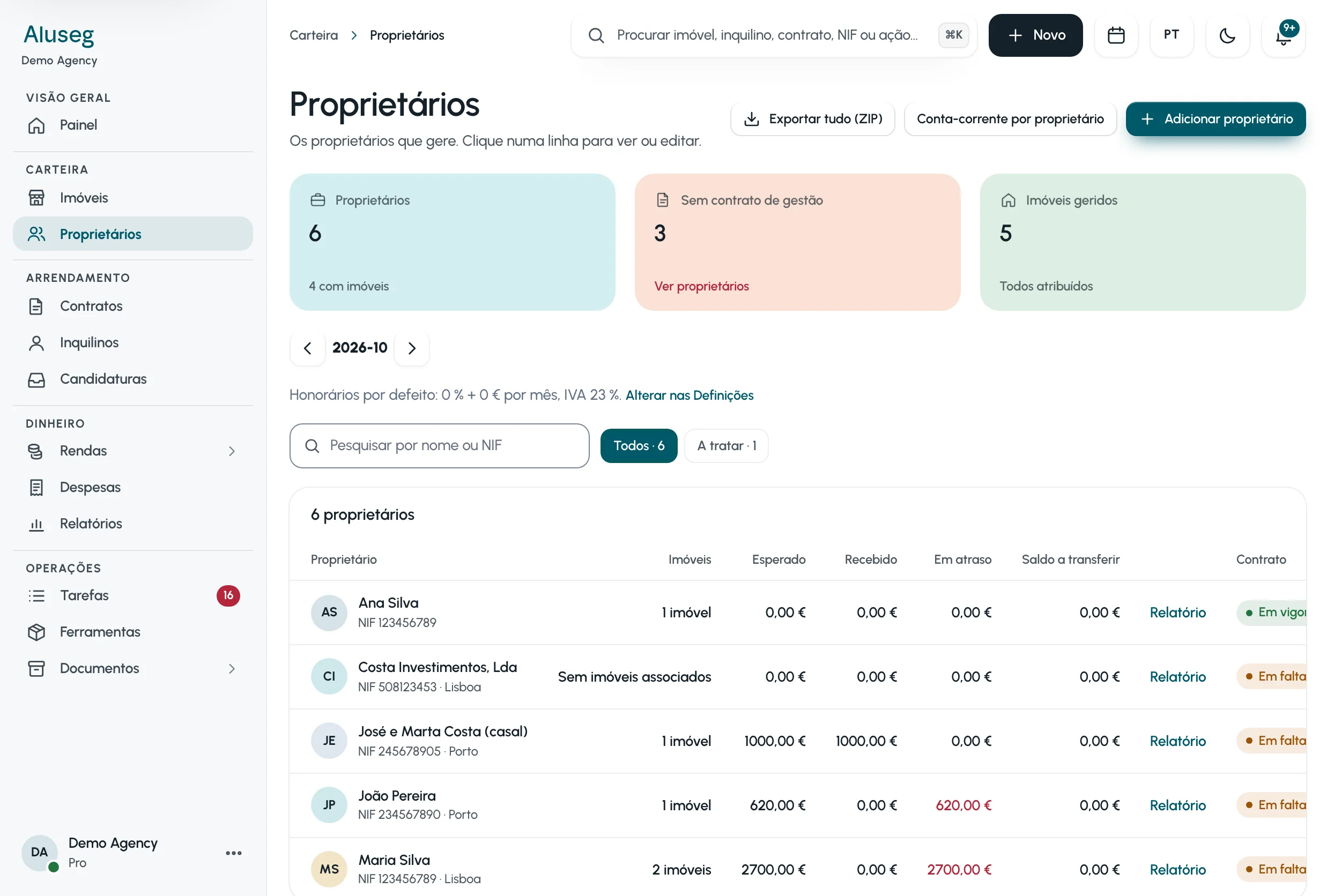
Aluseg app for agencies: landlord portfolio, expected and late rents
  • Import done by our team, at no cost
  • SEPA direct debit to each landlord's account
  • Link to the tax authority in each landlord's name

Book a guided demo

We show you Aluseg with your own portfolio in 20 minutes. Tell us when suits you.

When would you like us to call

By sending, you agree that Aluseg uses these details to contact you about the demo. See our privacy policy.

Pro plan

Everything that is included.

 Up to 25 propertiesUp to 100 propertiesUp to 250 properties
Price and capacity
Price per month, billed yearly + VAT€29€59€99
Price per month, billed monthly + VAT€35€69€119
PropertiesUp to 25Up to 100Up to 250
Properties and tenantsUnlimitedUnlimitedUnlimited
Team usersUnlimitedUnlimitedUnlimited
Document storageUnlimitedUnlimitedUnlimited
Portfolio and landlords
Several landlords, each with their own tax ID, IBAN and credentials
Portfolio table view, by landlord
Assign properties to a landlord in bulk
Portfolio map filtered by landlord
Portfolio import from your current software or Excel (done by us)
Tenant portal with the agency's brand
Owner portal, no account needed (properties, statements, documents)
Management agreement per landlord
Team roles (administrator, manager, view-only) and a manager per property
Change history
Statements and fees
Monthly account per landlord, closed and sent in bulk
Fees per property, per landlord or by default
Expenses paid by the agency, deducted from the landlord
Repair approval by the landlord
Leases and applications
NRAU lease with electronic signature
Lease and signature in the landlord's name
Leases with the agency's brand
Import leases from PDF (OCR)
Application link per property
Automatic applicant solvency check
Letter templates and rental documents
Rents and arrears
SEPA Direct Debit, straight to the landlord's account
Arrears with next step, deadline and timeline
Annual rent update, in bulk by landlord
Deposits tracked per property
Tax authority, expenses and accounting
Lease registered with the AT
Electronic rent receipts with the AT, by landlord (individual landlords)
Monthly invoicing CSV export, for each owner's certified software
Data webhook (n8n, Make)
Expenses per property, with invoice scanning
Annex F by landlord and reports per property
Financial analytics and report export
Read-only access for the accountant
Tenant solvency checks
Checks included per year25100500
Price of each extra check€2€2€2
Fees and extras
SEPA Direct Debit, per successful debit (+ VAT, no minimum)€1.50 + VAT€1.50 + VAT€1.50 + VAT
Rejected SEPA debit, paid by the tenant (at the provider's cost)€3.50€3.50€3.50
SEPA debit dispute (at the provider's cost)€15€15€15
Registered letter with return receipt€14.99 per letter€14.99 per letter€14.99 per letter
Portfolio import (current software or Excel)Free, done by our teamFree, done by our teamFree, done by our team
Certified invoicing of fees (add-on), up to 100 documents per month€5 + VAT per month (€10 in a month above 100)€5 + VAT per month (€10 in a month above 100)€5 + VAT per month (€10 in a month above 100)

Security and trust

  • Data in the European Union (Frankfurt), encrypted
  • The rent goes straight to the landlord's account: Aluseg never holds the money
  • Official link with the Tax Authority, credentials stored encrypted
  • GDPR compliant
  • Made in Portugal, in Matosinhos

How to start

From the free account to the first receipt, in three steps.

  1. Step 1

    Create the agency account


    3 months free. Add the landlords and properties of the portfolio, or let us import everything for you.

  2. Step 2

    We import your portfolio


    Send us your Excel file or the export from your current software. Our team imports the leases, landlords, tenants and properties at no cost, and you confirm the result before you start. Prefer to do it yourself? The preview shows everything before saving.

  3. Step 3

    Let receipts and rents run


    The lease is reported to the AT, the rent receipt goes out every month and late payments stay in view.

Book a demo with our team.

No commitment. Privacy policy.

Frequently asked questions

What agencies ask

What is the best rental management software for a real estate agency?
How much does Aluseg cost for an agency?
Can I manage several landlords in the same account?
Does Aluseg replace my brokerage software?
Does Aluseg issue electronic rent receipts on the tax authority portal?
Is it worth swapping Excel for rent management software?
How do I move my leases from Excel to Aluseg?
Does rent money go through Aluseg?
How much does a failed SEPA debit cost?
Who pays the €3.50 on a failed debit?
Can I put my agency's brand on the tenant portal?
Can my team work in the same account?
Can landlords see their accounts without calling me?
Does the tenant pay anything?
How much is certified invoicing?
Does Aluseg sell rent insurance?

Aluga. Aluseg.

The whole portfolio on one platform.

  • 3 months free
  • Free portfolio import
  • No activation fee