
For agencies and property managers
Rent bank reconciliation, without matching line by line.
For a portfolio of 40 leases, checking payments against the bank statement takes about 10 hours a month (an estimate, 15 minutes per lease). In Aluseg you import the bank file and received rents are matched to leases.
- Unlimited on the Pro plan
- The statement is never stored
- 3 months free
- checking payments and statements for a portfolio of 40 leases, at 15 minutes each (an estimate, part of the simulator's 45 minutes)
- ~10 h a month
- of statement accepted, CSV, Excel, OFX, MT940 and CAMT.053
- 5 formats
- stored by Aluseg, the file is read in the browser and never stored
- 0 statements
Without Aluseg and with Aluseg
From the bank statement to the rent received
At many agencies, rent bank reconciliation means a bank statement open beside a spreadsheet. See what changes. Times are estimates.
| Without Aluseg | With Aluseg | |
|---|---|---|
| The statement | Download from the bank and open it in Excel | Import the bank file (CSV, Excel, OFX, MT940 or CAMT.053) |
| Matching each payment to a rent | Look up the tenant's name and the amount, line by line | Received rents are matched to leases |
| Confidentiality | Bank files copied into folders and emails | The file is read in the browser and never stored |
| Rents still to come | A red cell and whoever remembers to chase | Rents still to receive and late rents stay in view, with the next step |
| Several landlords | A tab or a sheet per landlord | All landlords in the same agency account |
| After checking | Update the sheet and prepare each landlord's statement | Received rents are recorded, ready for the monthly statement |
| Estimated time (40 leases) | About 10 hours a month | One import a month, instead of one check per lease |
The time is an estimate (15 minutes per lease per month), not a promise. Change the values in the simulator.
How it works
From statement to received rents, in three steps
- Step 1
Download the statement from your bank
As CSV, Excel, OFX, MT940 or CAMT.053, whichever format your bank offers.
- Step 2
Import the file into Aluseg
The file is read in the browser and never stored. There is no automatic link to the bank.
- Step 3
See the rents matched to leases
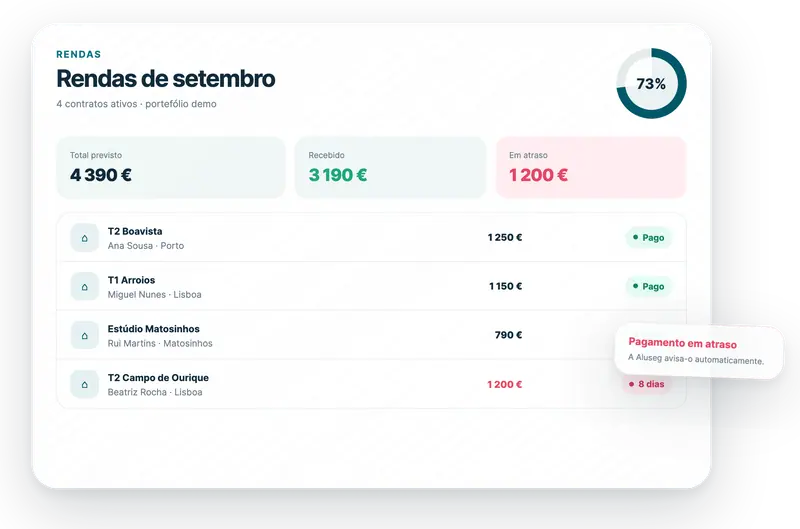
Received rents are matched to leases, and the ones still missing stay in view.
What is included
Bank reconciliation on the Pro plan, with no limit
Statement import is unlimited on the Pro plan, on all three tiers. Received rents are ready for each landlord's monthly statement. See also rent receipts for agencies.
Five statement formats
CSV, Excel, OFX, MT940 and CAMT.053. No converting or rewriting the file.
Read in the browser, never stored
Your bank statement is not stored in Aluseg.
Rents matched to leases
Received rents are matched to each landlord's leases.
Several landlords, one account
The rents of all landlords in the same account, with your team and each person's role.
Late rents in view
What has not been received stays in view, with the next step. See late rent tracking.
SEPA direct debit, optional
If you prefer to collect by SEPA direct debit, the money goes straight to the landlord's account. 1% fee per rent (min €0.50, max €3). Aluseg does not hold third-party funds.
Frequently asked questions
Rent bank reconciliation
How much does it cost?
The first 3 months are free. After that, the Pro plan costs €29/month + VAT up to 25 leases, €59 up to 100 and €99 up to 500, with no activation fee, and we migrate your portfolio. Statement import is unlimited. See the tiers.
Does Aluseg connect to my bank?
No. There is no automatic link to the bank. You download the statement from your bank and import the file into Aluseg.
Which statement formats can I import?
CSV, Excel, OFX, MT940 and CAMT.053.
Is my bank statement stored in Aluseg?
No. The file is read in the browser and never stored.
Is there a limit on imports?
On the Pro plan, statement import is unlimited, on all three tiers.
Does the rent money go through Aluseg?
No. SEPA direct debit collection is optional and goes straight from the tenant to the landlord's account (1% fee per rent, min €0.50, max €3). Aluseg does not hold third-party funds.
How do I move my portfolio to Aluseg?
Import the portfolio from Excel, CSV or Rentila, with a preview before saving. If you prefer, we do the migration with you, with no activation fee. See how to migrate from Excel to Aluseg.
Fewer hours checking statements. More time for your portfolio.
Start with 3 months free and import your first bank statement. Time saved is estimated, not promised.
3 months free · no activation fee